
CCI overview
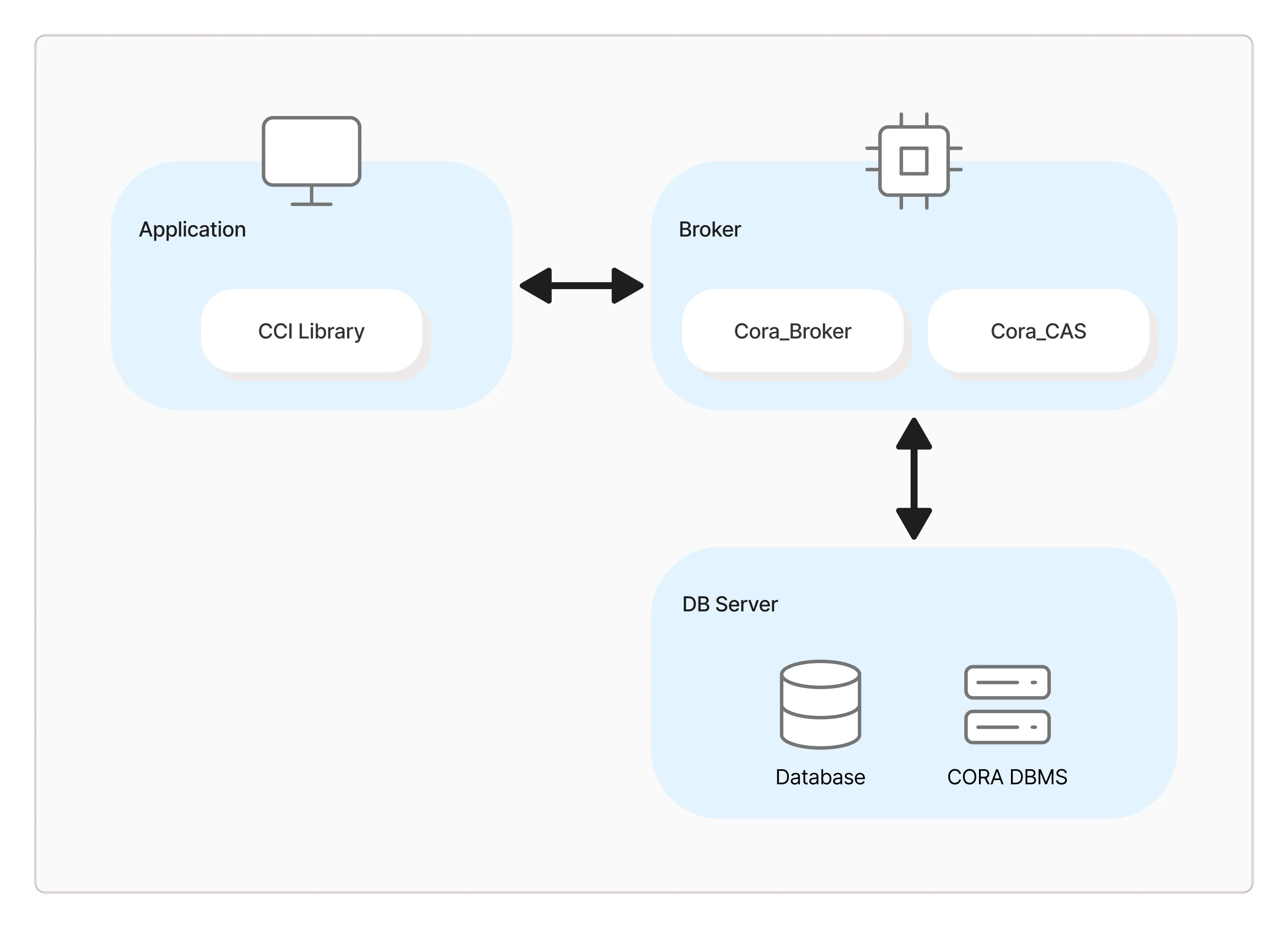
CoraDB CCI (C Client Interface) driver implements an interface to enable access from C-based application to CoraDB database server through broker. In this environment, the CoraDB broker sends queries received from applications to a database and transfers the result to applications.
It is automatically installed upon CoraDB installation and can be found in the $CORADB/lib directory. A header file as well as library files is required to use the driver.
| Windows | UNIX/Linux | |
|---|---|---|
| C header file | include/cas_cci.h | include/cas_cci.h |
| Static library | lib/cascci.lib | lib/libcascci.a |
| Dynamic library | bin/cascci.dll | lib/libcascci.so |
Because the CCI driver connects through the CoraDB broker, you manage it the same way as the other drivers (JDBC, Node.js, PHP, ADO.NET, Python). The other drivers do not use CCI: each of them implements the broker protocol itself.
CCI programming
Section titled “CCI programming”Writing CCI applications
Section titled “Writing CCI applications”The applications using CCI interact with CoraDB in the process of connecting to CAS, preparing queries, executing queries, handling response, and disconnecting. In each process, CCI communicates with applications through connection handle, query handle, and response handle.
The default value of auto-commit mode can be configured by using CCI_DEFAULT_AUTOCOMMIT which is a broker parameter. If it is omitted, the default value is set to ON. To change auto-commit mode within applications, you should use the cci_set_autocommit function. If auto-commit mode is OFF, you should explicitly commit or roll back transactions by using the cci_end_tran function.
General process for writing applications is as follows. For using the prepared statement, additional step binding data to a variable is required; the examples 1 and 2 show the way to implement this.
- Opening a database connection handle (related functions: cci_connect, cci_connect_with_url)
- Getting the request handle for the prepared statement (related function: cci_prepare)
- Binding data to the prepared statement (related function: cci_bind_param)
- Executing the prepared statement (related function: cci_execute)
- Processing the execution result (related functions: cci_cursor, cci_fetch, cci_get_data, cci_get_result_info)
- Closing the request handle (related function: cci_close_req_handle)
- Closing the database connection handle (related function: cci_disconnect)
- Using database connection pool (related functions: cci_property_create, cci_property_destroy, cci_property_set, cci_datasource_create, cci_datasource_destroy, cci_datasource_borrow, cci_datasource_release, cci_datasource_change_property)
Example 1
// Example to execute a simple query// In Linux: gcc -o simple simple.c -m64 -I${CORADB}/include -lnsl ${CORADB}/lib/libcascci.so -lpthread
#include <stdio.h>#include "cas_cci.h"#define BUFSIZE  (1024)
intmain (void){    int con = 0, req = 0, col_count = 0, i, ind;    int error;    char *data;    T_CCI_ERROR cci_error;    T_CCI_COL_INFO *col_info;    T_CCI_CORADB_STMT stmt_type;    char *query = "select * from countries";
    //getting a connection handle for a connection with a server    con = cci_connect ("localhost", 33000, "e-commerce", "dba", "");    if (con < 0)    {        printf ("cannot connect to database\n");        return 1;    }
    //preparing the SQL statement    req = cci_prepare (con, query, 0, &cci_error);    if (req < 0)    {        printf ("prepare error: %d, %s\n", cci_error.err_code,                cci_error.err_msg);        goto handle_error;    }
    //getting column information when the prepared statement is the SELECT query    col_info = cci_get_result_info (req, &stmt_type, &col_count);    if (col_info == NULL)    {        printf ("get_result_info error: %d, %s\n", cci_error.err_code,                cci_error.err_msg);        goto handle_error;    }
    //Executing the prepared SQL statement    error = cci_execute (req, 0, 0, &cci_error);    if (error < 0)    {        printf ("execute error: %d, %s\n", cci_error.err_code,                cci_error.err_msg);        goto handle_error;    }    while (1)    {
        //Moving the cursor to access a specific tuple of results        error = cci_cursor (req, 1, CCI_CURSOR_CURRENT, &cci_error);        if (error == CCI_ER_NO_MORE_DATA)        {            break;        }        if (error < 0)        {            printf ("cursor error: %d, %s\n", cci_error.err_code,                    cci_error.err_msg);            goto handle_error;        }
        //Fetching the query result into a client buffer        error = cci_fetch (req, &cci_error);        if (error < 0)        {            printf ("fetch error: %d, %s\n", cci_error.err_code,                    cci_error.err_msg);            goto handle_error;        }        for (i = 1; i <= col_count; i++)        {
            //Getting data from the fetched result            error = cci_get_data (req, i, CCI_A_TYPE_STR, &data, &ind);            if (error < 0)            {                printf ("get_data error: %d, %d\n", error, i);                goto handle_error;            }            printf ("%s\t|", data);        }        printf ("\n");    }
    //Closing the request handle    error = cci_close_req_handle (req);    if (error < 0)    {        printf ("close_req_handle error: %d, %s\n", cci_error.err_code,                cci_error.err_msg);        goto handle_error;    }
    //Disconnecting with the server    error = cci_disconnect (con, &cci_error);    if (error < 0)    {        printf ("error: %d, %s\n", cci_error.err_code, cci_error.err_msg);        goto handle_error;    }
    return 0;
handle_error:    if (req > 0)        cci_close_req_handle (req);    if (con > 0)    cci_disconnect (con, &cci_error);
    return 1;}
Example 2
// Example to execute a query with a bind variable// In Linux: gcc -o cci_bind cci_bind.c -m64 -I${CORADB}/include -lnsl ${CORADB}/lib/libcascci.so -lpthread
#include <stdio.h>#include <string.h>#include "cas_cci.h"#define BUFSIZE  (1024)
intmain (void){    int con = 0, req = 0, col_count = 0, i, ind;    int error;    char *data;    T_CCI_ERROR cci_error;    T_CCI_COL_INFO *col_info;    T_CCI_CORADB_STMT stmt_type;    char *query = "select id, company_name from customer where company_name = ?";    char namebuf[128];
    //getting a connection handle for a connection with a server    con = cci_connect ("localhost", 33000, "e-commerce", "dba", "");    if (con < 0)    {        printf ("cannot connect to database\n");        return 1;    }
    //preparing the SQL statement    req = cci_prepare (con, query, 0, &cci_error);    if (req < 0)    {        printf ("prepare error: %d, %s\n", cci_error.err_code,              cci_error.err_msg);        goto handle_error;    }
    //Binding date into a value    strcpy (namebuf, "Jones LLC");    error =    cci_bind_param (req, 1, CCI_A_TYPE_STR, namebuf, CCI_U_TYPE_STRING,                    CCI_BIND_PTR);    if (error < 0)    {        printf ("bind_param error: %d ", error);        goto handle_error;    }
    //getting column information when the prepared statement is the SELECT query    col_info = cci_get_result_info (req, &stmt_type, &col_count);    if (col_info == NULL)    {        printf ("get_result_info error: %d, %s\n", cci_error.err_code,              cci_error.err_msg);        goto handle_error;    }
    //Executing the prepared SQL statement    error = cci_execute (req, 0, 0, &cci_error);    if (error < 0)    {        printf ("execute error: %d, %s\n", cci_error.err_code,              cci_error.err_msg);        goto handle_error;    }
    while (1)    {
        //Moving the cursor to access a specific tuple of results        error = cci_cursor (req, 1, CCI_CURSOR_CURRENT, &cci_error);        if (error == CCI_ER_NO_MORE_DATA)        {            break;        }        if (error < 0)        {            printf ("cursor error: %d, %s\n", cci_error.err_code,                  cci_error.err_msg);            goto handle_error;        }
        //Fetching the query result into a client buffer        error = cci_fetch (req, &cci_error);        if (error < 0)        {            printf ("fetch error: %d, %s\n", cci_error.err_code,                  cci_error.err_msg);            goto handle_error;        }        for (i = 1; i <= col_count; i++)        {
            //Getting data from the fetched result            error = cci_get_data (req, i, CCI_A_TYPE_STR, &data, &ind);            if (error < 0)            {                printf ("get_data error: %d, %d\n", error, i);                goto handle_error;            }            if (ind == -1)            {                printf ("NULL\t");            }            else            {                printf ("%s\t|", data);            }        }            printf ("\n");    }
    //Closing the request handle    error = cci_close_req_handle (req);    if (error < 0)    {        printf ("close_req_handle error: %d, %s\n", cci_error.err_code,                cci_error.err_msg);        goto handle_error;    }
    //Disconnecting with the server    error = cci_disconnect (con, &cci_error);    if (error < 0)    {        printf ("error: %d, %s\n", cci_error.err_code, cci_error.err_msg);        goto handle_error;    }
    return 0;
handle_error:    if (req > 0)        cci_close_req_handle (req);    if (con > 0)        cci_disconnect (con, &cci_error);    return 1;}
Example 3
// Example to use connection/statement pool in CCI// In Linux: gcc -o cci_pool cci_pool.c -m64 -I${CORADB}/include -lnsl ${CORADB}/lib/libcascci.so -lpthread
#include <stdio.h>#include "cas_cci.h"
int main (){    T_CCI_PROPERTIES *ps = NULL;    T_CCI_DATASOURCE *ds = NULL;    T_CCI_ERROR err;    T_CCI_CONN cons;    int rc = 1, i;
    ps = cci_property_create ();    if (ps == NULL)    {        fprintf (stderr, "Could not create T_CCI_PROPERTIES.\n");        rc = 0;        goto cci_pool_end;    }
    cci_property_set (ps, "user", "dba");    cci_property_set (ps, "url", "cci:coradb:localhost:33000:e-commerce:::");    cci_property_set (ps, "pool_size", "10");    cci_property_set (ps, "max_wait", "1200");    cci_property_set (ps, "pool_prepared_statement", "true");    cci_property_set (ps, "login_timeout", "300000");    cci_property_set (ps, "query_timeout", "3000");
    ds = cci_datasource_create (ps, &err);    if (ds == NULL)    {        fprintf (stderr, "Could not create T_CCI_DATASOURCE.\n");        fprintf (stderr, "E[%d,%s]\n", err.err_code, err.err_msg);        rc = 0;        goto cci_pool_end;    }
    for (i = 0; i < 3; i++)    {        cons = cci_datasource_borrow (ds, &err);        if (cons < 0)        {            fprintf (stderr,                    "Could not borrow a connection from the data source.\n");            fprintf (stderr, "E[%d,%s]\n", err.err_code, err.err_msg);            continue;        }        // put working code here.        cci_work (cons);        cci_datasource_release (ds, cons, &err);
    }
cci_pool_end:  cci_property_destroy (ps);  cci_datasource_destroy (ds);
  return 0;}
// working codeint cci_work (T_CCI_CONN con){    T_CCI_ERROR err;    char sql[4096];    int req, res, error, ind;    int data;
    cci_set_autocommit (con, CCI_AUTOCOMMIT_TRUE);    cci_set_lock_timeout (con, 100, &err);    cci_set_isolation_level (con, TRAN_READ_COMMITTED, &err);
    error = 0;    snprintf (sql, 4096, "SELECT YEAR(order_date) FROM orders WHERE id = 1");    req = cci_prepare (con, sql, 0, &err);    if (req < 0)    {        printf ("prepare error: %d, %s\n", err.err_code, err.err_msg);        return error;    }
    res = cci_execute (req, 0, 0, &err);    if (res < 0)    {        printf ("execute error: %d, %s\n", err.err_code, err.err_msg);        goto cci_work_end;    }
    while (1)    {    error = cci_cursor (req, 1, CCI_CURSOR_CURRENT, &err);    if (error == CCI_ER_NO_MORE_DATA)    {        break;    }    if (error < 0)    {        printf ("cursor error: %d, %s\n", err.err_code, err.err_msg);        goto cci_work_end;    }
    error = cci_fetch (req, &err);    if (error < 0)    {        printf ("fetch error: %d, %s\n", err.err_code, err.err_msg);        goto cci_work_end;    }
    error = cci_get_data (req, 1, CCI_A_TYPE_INT, &data, &ind);    if (error < 0)    {        printf ("get data error: %d\n", error);        goto cci_work_end;    }    printf ("%d\n", data);    }
    error = 1;cci_work_end:    cci_close_req_handle (req);    return error;}
Configuring library
Section titled “Configuring library”Once you have written applications using CCI, you should decide, according to its features, whether to execute CCI as static or dynamic link before you build it. See the table in CCI overview to decide which library will be used.
The following is an example of Makefile, which makes a link by using the dynamic library on UNIX/Linux.
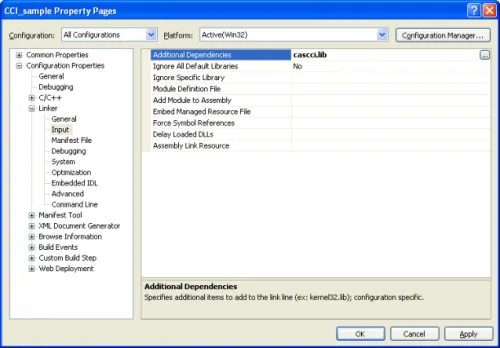
CC=gccCFLAGS = -g -Wall -I. -I$CORADB/includeLDFLAGS = -L$CORADB/lib -lcascci -lnslTEST_OBJS = test.oEXES = testall: $(EXES)test: $(TEST_OBJS) $(CC) -o $@ $(TEST_OBJS) $(LDFLAGS)The following image shows configuration to use static library on Windows.
Using BLOB/CLOB
Section titled “Using BLOB/CLOB”Storing LOB data
You can create LOB data file and bind the data by using the functions below in CCI applications.
- Creating LOB data files (related functions: cci_blob_new, cci_blob_write)
- Binding LOB data (related function: cci_bind_param)
- Freeing memory for LOB struct (related function: cci_blob_free)
Example
int con = 0; /* connection handle */int req = 0; /* request handle */int res;int n_executed;int i;T_CCI_ERROR error;T_CCI_BLOB blob = NULL;char data[1024] = "bulabula";
con = cci_connect ("localhost", 33000, "tdb", "PUBLIC", "");if (con < 0) {    goto handle_error;}req = cci_prepare (con, "insert into doc (doc_id, content) values (?,?)", 0, &error);if (req< 0){    goto handle_error;}
res = cci_bind_param (req, 1 /* binding index*/, CCI_A_TYPE_STR, "doc-10", CCI_U_TYPE_STRING, CCI_BIND_PTR);
/* Creating an empty LOB data file */res = cci_blob_new (con, &blob, &error);res = cci_blob_write (con, blob, 0 /* start position */, 1024 /* length */, data, &error);
/* Binding BLOB data */res = cci_bind_param (req, 2 /* binding index*/, CCI_A_TYPE_BLOB, (void *)blob, CCI_U_TYPE_BLOB, CCI_BIND_PTR);
n_executed = cci_execute (req, 0, 0, &error);if (n_executed < 0){    goto handle_error;}
/* Commit */if (cci_end_tran(con, CCI_TRAN_COMMIT, &error) < 0){    goto handle_error;}
/* Memory free */cci_blob_free(blob);return 0;
handle_error:if (blob != NULL){    cci_blob_free(blob);}if (req > 0){    cci_close_req_handle (req);}if (con > 0){    cci_disconnect(con, &error);}return -1;
Retrieving LOB data
You can retrieve LOB data by using the following functions in CCI applications. Note that if you enter data in the LOB type column, the actual LOB data is stored in the file located in external storage and Locator value is stored in the LOB type column. Thus, to retrieve the LOB data stored in the file, you should call the cci_blob_read function but the cci_get_data function.
- Retrieving meta data (Locator) in the the LOB type column (related function: cci_get_data)
- Retrieving the LOB data (related function: cci_blob_read)
- Freeing memory for the LOB struct: (related function: cci_blob_free)
Example
int con = 0; /* connection handle */int req = 0; /* request handle */int ind; /* NULL indicator, 0 if not NULL, -1 if NULL*/int res;int i;T_CCI_ERROR error;T_CCI_BLOB blob;char buffer[1024];
con = cci_connect ("localhost", 33000, "image_db", "PUBLIC", "");if (con < 0){    goto handle_error;}req = cci_prepare (con, "select content from doc_t", 0 /*flag*/, &error);if (req< 0){    goto handle_error;}
res = cci_execute (req, 0/*flag*/, 0/*max_col_size*/, &error);
while (1) {    res = cci_cursor (req, 1/* offset */, CCI_CURSOR_CURRENT/* cursor position */, &error);    if (res == CCI_ER_NO_MORE_DATA)    {        break;    }    res = cci_fetch (req, &error);
    /* Fetching CLOB Locator */    res = cci_get_data (req, 1 /* column index */, CCI_A_TYPE_BLOB,    (void *)&blob /* BLOB handle */, &ind /* NULL indicator */);    /* Fetching CLOB data */    res = cci_blob_read (con, blob, 0 /* start position */, 1024 /* length */, buffer, &error);    printf ("content = %s\n", buffer);}
/* Memory free */cci_blob_free(blob);res=cci_close_req_handle(req);res = cci_disconnect (con, &error);return 0;
handle_error:if (req > 0){    cci_close_req_handle (req);}if (con > 0){    cci_disconnect(con, &error);}return -1;
CCI error codes and error messages
Section titled “CCI error codes and error messages”CCI API functions return a negative number as CCI or CAS (broker application server) error codes when an error occurs. The CCI error codes occur in CCI API functions and CAS error codes occur in CAS.
- All error codes are negative.
- All error codes and error messages of functions which have "T_CCI_ERROR err_buf" as a parameter can be found on err_buf.err_code and err_buf.err_msg.
- All error messages of functions which have no "T_CCI_ERROR err_buf" as a parameter can output by using cci_get_err_msg.
- If the value of error code is between -20002 and -20999, it is caused by CCI API functions.
- If the value of error code is between -10000 and -10999, it is caused by CAS and transferred by CCI API functions. For CAS errors, see CAS error.
- If the value of error code is CCI_ER_DBMS (-20001), it is caused by database server. You can check server error codes in err_buf.err_code of the database error buffer (err_buf). For database server errors, see Database server errors.
The database error buffer (err_buf) is a struct variable of T_CCI_ERROR defined in the cas_cci.h header file. For how to use it, see the example below.
CCI error codes which starting with CCI_ER are defined in enum called T_CCI_ERROR_CODE under the $CORADB/include/cas_cci.h file. Therefore, to use this error code name in program code, you should include a header file in the upper side of code by entering #include "cas_cci.h".
The following example shows how to display error messages. In the example, the error code value (req) returned by cci_prepare is CCI_ER_DBMS. -493 (server error code) is stored in cci_error.err_code and the error message, 'Syntax: Unknown class "notable". select * from notable' is stored in cci_error.err_msg of the database error buffer.
// gcc -o err err.c -m64 -I${CORADB}/include -lnsl ${CORADB}/lib/libcascci.so -lpthread#include <stdio.h>#include "cas_cci.h"
#define BUFSIZE  (1024)
intmain (void){    int con = 0, req = 0, col_count = 0, i, ind;    int error;    char *data;    T_CCI_ERROR err_buf;    char *query = "select * from notable";
    //getting a connection handle for a connection with a server    con = cci_connect ("localhost", 33000, "e-commerce", "dba", "");    if (con < 0)    {        printf ("cannot connect to database\n");        return 1;    }
    //preparing the SQL statement    req = cci_prepare (con, query, 0, &err_buf);    if (req < 0)    {        if (req == CCI_ER_DBMS)        {            printf ("error from server: %d, %s\n", err_buf.err_code, err_buf.err_msg);        }        else        {            printf ("error from cci or cas: %d, %s\n", err_buf.err_code, err_buf.err_msg);        }        goto handle_error;    }    // ...}
The following list shows CCI error codes. For CAS errors, see CAS error.
| Error code | Number | Message | Notes |
|---|---|---|---|
| CCI_ER_DBMS | -20001 | CoraDB DBMS Error | The database server returned an error; its code and message are in err_code and err_msg of the T_CCI_ERROR buffer. |
| CCI_ER_CON_HANDLE | -20002 | Invalid connection handle | |
| CCI_ER_NO_MORE_MEMORY | -20003 | Memory allocation error | Insufficient memory. |
| CCI_ER_COMMUNICATION | -20004 | Cannot communicate with server | |
| CCI_ER_NO_MORE_DATA | -20005 | Invalid cursor position | No more rows, or the cursor moved outside the result. |
| CCI_ER_TRAN_TYPE | -20006 | Unknown transaction type | |
| CCI_ER_STRING_PARAM | -20007 | Invalid string argument | For example, the SQL text passed to cci_prepare is NULL. |
| CCI_ER_TYPE_CONVERSION | -20008 | Type conversion error | A value cannot be converted to the requested type. |
| CCI_ER_BIND_INDEX | -20009 | Parameter index is out of range | |
| CCI_ER_ATYPE | -20010 | Invalid T_CCI_A_TYPE value | |
| CCI_ER_NOT_BIND | -20011 | Not used | |
| CCI_ER_PARAM_NAME | -20012 | Invalid T_CCI_DB_PARAM value | |
| CCI_ER_COLUMN_INDEX | -20013 | Column index is out of range | |
| CCI_ER_SCHEMA_TYPE | -20014 | Not used | |
| CCI_ER_FILE | -20015 | Cannot open file | A file cannot be opened, read or written. |
| CCI_ER_CONNECT | -20016 | Cannot connect to CORADB CAS | |
| CCI_ER_ALLOC_CON_HANDLE | -20017 | Cannot allocate connection handle | |
| CCI_ER_REQ_HANDLE | -20018 | Cannot allocate request handle | Also returned for an invalid request handle. |
| CCI_ER_INVALID_CURSOR_POS | -20019 | Invalid cursor position | |
| CCI_ER_OBJECT | -20020 | Invalid oid string | |
| CCI_ER_CAS | -20021 | Not used | |
| CCI_ER_HOSTNAME | -20022 | Unknown host name | |
| CCI_ER_OID_CMD | -20023 | Invalid T_CCI_OID_CMD value | |
| CCI_ER_BIND_ARRAY_SIZE | -20024 | Array binding size is not specified | Call cci_bind_param_array_size before binding arrays. |
| CCI_ER_ISOLATION_LEVEL | -20025 | Unknown transaction isolation level | |
| CCI_ER_SET_INDEX | -20026 | Invalid set index | An invalid index was used to read an element of a T_CCI_SET. |
| CCI_ER_DELETED_TUPLE | -20027 | Current row was deleted | |
| CCI_ER_SAVEPOINT_CMD | -20028 | Invalid T_CCI_SAVEPOINT_CMD value | An invalid command was passed to cci_savepoint. |
| CCI_ER_THREAD_RUNNING | -20029 | Thread is running | |
| CCI_ER_INVALID_URL | -20030 | Invalid url string | |
| CCI_ER_INVALID_LOB_READ_POS | -20031 | Invalid lob read position | |
| CCI_ER_INVALID_LOB_HANDLE | -20032 | Invalid lob handle | |
| CCI_ER_NO_PROPERTY | -20033 | Cannot find a property | |
| CCI_ER_PROPERTY_TYPE | -20034 | Invalid property value | |
| CCI_ER_INVALID_DATASOURCE | -20035 | Invalid CCI datasource | |
| CCI_ER_DATASOURCE_TIMEOUT | -20036 | All connections are used | No connection of the data source became free within the wait time. |
| CCI_ER_DATASOURCE_TIMEDWAIT | -20037 | pthread_cond_timedwait error | |
| CCI_ER_LOGIN_TIMEOUT | -20038 | Connection timed out | |
| CCI_ER_QUERY_TIMEOUT | -20039 | Request timed out | |
| CCI_ER_RESULT_SET_CLOSED | -20040 | Result set is closed | |
| CCI_ER_INVALID_HOLDABILITY | -20041 | Invalid holdability mode. The only accepted values are 0 or 1 | |
| CCI_ER_NOT_UPDATABLE | -20042 | Request handle is not updatable | |
| CCI_ER_INVALID_ARGS | -20043 | Invalid argument | |
| CCI_ER_USED_CONNECTION | -20044 | This connection is used already. | The connection was borrowed from a data source and is in use. |
| CCI_ER_SSL_HANDSHAKE | -21047 | SSL handshake failure | TLS negotiation with an SSL broker failed. |
| CCI_ER_NOT_IMPLEMENTED | -20099 | Not implemented |
C type definition
The following shows the structs used in CCI API functions.
| Name | Type | Member | Description |
|---|---|---|---|
| T_CCI_ERROR | struct | char err_msg[1024] | Representation of database error info |
| int err_code | |||
| T_CCI_BIT | struct | int size | Representation of bit type |
| char *buf | |||
| T_CCI_DATE | struct | short yr | Representation of datetime, timestamp, date, And time type |
| short mon | |||
| short day | |||
| short hh | |||
| short mm | |||
| short ss | |||
| short ms | |||
| T_CCI_DATE_TZ | struct | short yr | Representation of date/time types with timezone |
| short mon | |||
| short day | |||
| short hh | |||
| short mm | |||
| short ss | |||
| short ms | |||
| char tz[64] | |||
| T_CCI_SET | void* | Representation of set type | |
| T_CCI_COL_INFO | struct | T_CCI_U_EXT_TYPE type | Representation of column information for the SELECT statement |
| char is_non_null | |||
| short scale | |||
| int precision | |||
| char *col_name | |||
| char *real_attr | |||
| char *class_name | |||
| T_CCI_QUERY_RESULT | struct | int result_count | Results of batch execution |
| int stmt_type | |||
| char *err_msg | |||
| char oid[32] | |||
| T_CCI_PARAM_INFO | struct | T_CCI_PARAM_MODE mode | Representation of input parameter info |
| T_CCI_U_EXT_TYPE type | |||
| short scale | |||
| int precision | |||
| T_CCI_U_EXT_TYPE | unsigned char | Database type info | |
| T_CCI_U_TYPE | enum | CCI_U_TYPE_UNKNOWN | Database type info |
| CCI_U_TYPE_NULL | |||
| CCI_U_TYPE_CHAR | |||
| CCI_U_TYPE_STRING | |||
| CCI_U_TYPE_BIT | |||
| CCI_U_TYPE_VARBIT | |||
| CCI_U_TYPE_NUMERIC | |||
| CCI_U_TYPE_INT | |||
| CCI_U_TYPE_SHORT | |||
| CCI_U_TYPE_FLOAT | |||
| CCI_U_TYPE_DOUBLE | |||
| CCI_U_TYPE_DATE | |||
| CCI_U_TYPE_TIME | |||
| CCI_U_TYPE_TIMESTAMP | |||
| CCI_U_TYPE_SET | |||
| CCI_U_TYPE_MULTISET | |||
| CCI_U_TYPE_SEQUENCE | |||
| CCI_U_TYPE_OBJECT | |||
| CCI_U_TYPE_BIGINT | |||
| CCI_U_TYPE_DATETIME | |||
| CCI_U_TYPE_BLOB | |||
| CCI_U_TYPE_CLOB | |||
| CCI_U_TYPE_ENUM | |||
| CCI_U_TYPE_UINT | |||
| CCI_U_TYPE_USHORT | |||
| CCI_U_TYPE_UBIGINT | |||
| CCI_U_TYPE_TIMESTAMPTZ | |||
| CCI_U_TYPE_TIMESTAMPLTZ | |||
| CCI_U_TYPE_DATETIMETZ | |||
| CCI_U_TYPE_DATETIMELTZ | |||
| T_CCI_A_TYPE | enum | CCI_A_TYPE_STR | Representation of type info used in API |
| CCI_A_TYPE_INT | |||
| CCI_A_TYPE_FLOAT | |||
| CCI_A_TYPE_DOUBLE | |||
| CCI_A_TYPE_BIT | |||
| CCI_A_TYPE_DATE | |||
| CCI_A_TYPE_SET | |||
| CCI_A_TYPE_BIGINT | |||
| CCI_A_TYPE_BLOB | |||
| CCI_A_TYPE_CLOB | |||
| CCI_A_TYPE_CLOB | |||
| CCI_A_TYPE_REQ_HANDLE | |||
| CCI_A_TYPE_UINT | |||
| CCI_A_TYPE_UBIGINT | |||
| CCI_A_TYPE_DATE_TZ | |||
| CCI_A_TYPE_UINT | |||
| T_CCI_DB_PARAM | enum | CCI_PARAM_ISOLATION_LEVEL | System parameter names |
| CCI_PARAM_LOCK_TIMEOUT | |||
| CCI_PARAM_MAX_STRING_LENGTH | |||
| CCI_PARAM_AUTO_COMMIT | |||
| T_CCI_SCH_TYPE | enum | CCI_SCH_CLASS | |
| CCI_SCH_VCLASS | |||
| CCI_SCH_QUERY_SPEC | |||
| CCI_SCH_ATTRIBUTE | |||
| CCI_SCH_CLASS_ATTRIBUTE | |||
| CCI_SCH_METHOD | |||
| CCI_SCH_CLASS_METHOD | |||
| CCI_SCH_METHOD_FILE | |||
| CCI_SCH_SUPERCLASS | |||
| CCI_SCH_SUBCLASS | |||
| CCI_SCH_CONSTRAIT | |||
| CCI_SCH_TRIGGER | |||
| CCI_SCH_CLASS_PRIVILEGE | |||
| CCI_SCH_ATTR_PRIVILEGE | |||
| CCI_SCH_DIRECT_SUPER_CLASS | |||
| CCI_SCH_PRIMARY_KEY | |||
| CCI_SCH_IMPORTED_KEYS | |||
| CCI_SCH_EXPORTED_KEYS | |||
| CCI_SCH_CROSS_REFERENCE | |||
| T_CCI_CORADB_STMT | enum | CORADB_STMT_ALTER_CLASS | |
| CORADB_STMT_ALTER_SERIAL | |||
| CORADB_STMT_COMMIT_WORK | |||
| CORADB_STMT_REGISTER_DATABASE | |||
| CORADB_STMT_CREATE_CLASS | |||
| CORADB_STMT_CREATE_INDEX | |||
| CORADB_STMT_CREATE_TRIGGER | |||
| CORADB_STMT_CREATE_SERIAL | |||
| CORADB_STMT_DROP_DATABASE | |||
| CORADB_STMT_DROP_CLASS | |||
| CORADB_STMT_DROP_INDEX | |||
| CORADB_STMT_DROP_LABEL | |||
| CORADB_STMT_DROP_TRIGGER | |||
| CORADB_STMT_DROP_SERIAL | |||
| CORADB_STMT_EVALUATE | |||
| CORADB_STMT_RENAME_CLASS | |||
| CORADB_STMT_ROLLBACK_WORK | |||
| CORADB_STMT_GRANT | |||
| CORADB_STMT_REVOKE | |||
| CORADB_STMT_STATISTICS | |||
| CORADB_STMT_INSERT | |||
| CORADB_STMT_SELECT | |||
| CORADB_STMT_UPDATE | |||
| CORADB_STMT_DELETE | |||
| CORADB_STMT_CALL | |||
| CORADB_STMT_GET_ISO_LVL | |||
| CORADB_STMT_GET_TIMEOUT | |||
| CORADB_STMT_GET_OPT_LVL | |||
| CORADB_STMT_SET_OPT_LVL | |||
| CORADB_STMT_SCOPE | |||
| CORADB_STMT_GET_TRIGGER | |||
| CORADB_STMT_SET_TRIGGER | |||
| CORADB_STMT_SAVEPOINT | |||
| CORADB_STMT_PREPARE | |||
| CORADB_STMT_ATTACH | |||
| CORADB_STMT_USE | |||
| CORADB_STMT_REMOVE_TRIGGER | |||
| CORADB_STMT_RENAME_TRIGGER | |||
| CORADB_STMT_ON_LDB | |||
| CORADB_STMT_GET_LDB | |||
| CORADB_STMT_SET_LDB | |||
| CORADB_STMT_GET_STATS | |||
| CORADB_STMT_CREATE_USER | |||
| CORADB_STMT_DROP_USER | |||
| CORADB_STMT_ALTER_USER | |||
| CORADB_STMT_SET_SYS_PARAMS | |||
| CORADB_STMT_ALTER_INDEX | |||
| CORADB_STMT_CREATE_STORED_PROCEDURE | |||
| CORADB_STMT_DROP_STORED_PROCEDURE | |||
| CORADB_STMT_PREPARE_STATEMENT | |||
| CORADB_STMT_EXECUTE_PREPARE | |||
| CORADB_STMT_DEALLOCATE_PREPARE | |||
| CORADB_STMT_TRUNCATE | |||
| CORADB_STMT_DO | |||
| CORADB_STMT_SELECT_UPDATE | |||
| CORADB_STMT_SET_SESSION_VARIABLES | |||
| CORADB_STMT_DROP_SESSION_VARIABLES | |||
| CORADB_STMT_MERGE | |||
| CORADB_STMT_SET_NAMES | |||
| CORADB_STMT_ALTER_STORED_PROCEDURE | |||
| CORADB_STMT_KILL | |||
| T_CCI_CURSOR_POS | enum | CCI_CURSOR_FIRST | |
| CCI_CURSOR_CURRENT | |||
| CCI_CURSOR_LAST | |||
| T_CCI_TRAN_ISOLATION | enum | TRAN_READ_COMMITTED | |
| TRAN_REPEATABLE_READ | |||
| TRAN_SERIALIZABLE | |||
| T_CCI_PARAM_MODE | enum | CCI_PARAM_MODE_UNKNOWN | |
| CCI_PARAM_MODE_IN | |||
| CCI_PARAM_MODE_OUT | |||
| CCI_PARAM_MODE_INOUT |
CCI sample program
Section titled “CCI sample program”The sample program connects to the e-commerce sample database, prints the database version, runs a query on the orders table and prints its column names and rows. It shows how to connect to a broker, prepare and execute a query, read the result and disconnect. It is built with the shared CCI library on Linux.
The orders table:
SELECT attr_name, data_type, prec, scale, is_nullable FROM db_attribute WHERE class_name = 'orders' ORDER BY def_order;| attr_name | data_type | prec | scale | is_nullable |
|---|---|---|---|---|
| id | INTEGER | 10 | 0 | NO |
| customer_id | INTEGER | 10 | 0 | NO |
| shipped_date | DATE | 10 | 0 | YES |
| shipping_cost | NUMERIC | 10 | 2 | NO |
| ship_address | STRING | 128 | 0 | NO |
| order_date | DATE | 10 | 0 | NO |
Preparing
Start the database server and the broker before running the program:
coradb server start e-commercecoradb broker startBuilding
With the program source and the Makefile prepared, executing make will create an executable file named test. If you use a static library, there is no need to deploy additional files and the execution will be faster. However, it increases the program size and memory usage. If you use a dynamic library, there will be some performance overhead but the program size and memory usage can be optimized.
The code below a command line that makes a test program build by using a dynamic library instead of using make on Linux.
cc -o test test.c -I$CORADB/include -L$CORADB/lib -lnsl -lcascciSample code
#include <stdio.h>#include <cas_cci.h>char *cci_client_name = "test";int main (int argc, char *argv[]){    int con = 0, req = 0, col_count = 0, res, ind, i;    T_CCI_ERROR error;    T_CCI_COL_INFO *res_col_info;    T_CCI_CORADB_STMT stmt_type;    char *buffer, db_ver[16];    printf("Program started!\n");    if ((con=cci_connect("localhost", 33000, "e-commerce", "dba", ""))<0) {        printf( "%s(%d): cci_connect fail\n", __FILE__, __LINE__);        return -1;    }
    if ((res=cci_get_db_version(con, db_ver, sizeof(db_ver)))<0) {        printf( "%s(%d): cci_get_db_version fail\n", __FILE__, __LINE__);        goto handle_error;    }    printf("DB Version is %s\n",db_ver);    if ((req=cci_prepare(con, "select id, order_date, shipping_cost from orders where customer_id = 102 order by id", 0,&error))<0) {        if (req < 0) {            printf( "%s(%d): cci_prepare fail(%d)\n", __FILE__, __LINE__,error.err_code);        }        goto handle_error;    }    printf("Prepare ok!(%d)\n",req);    res_col_info = cci_get_result_info(req, &stmt_type, &col_count);    if (!res_col_info) {        printf( "%s(%d): cci_get_result_info fail\n", __FILE__, __LINE__);        goto handle_error;    }
    printf("Result column information\n"           "========================================\n");    for (i=1; i<=col_count; i++) {        printf("name:%s  type:%d(precision:%d scale:%d)\n",            CCI_GET_RESULT_INFO_NAME(res_col_info, i),            CCI_GET_RESULT_INFO_TYPE(res_col_info, i),            CCI_GET_RESULT_INFO_PRECISION(res_col_info, i),            CCI_GET_RESULT_INFO_SCALE(res_col_info, i));    }    printf("========================================\n");    if ((res=cci_execute(req, 0, 0, &error))<0) {        if (req < 0) {            printf( "%s(%d): cci_execute fail(%d)\n", __FILE__, __LINE__,error.err_code);        }        goto handle_error;    }
    while (1) {        res = cci_cursor(req, 1, CCI_CURSOR_CURRENT, &error);        if (res == CCI_ER_NO_MORE_DATA) {            printf("Query END!\n");            break;        }        if (res<0) {            if (req < 0) {                printf( "%s(%d): cci_cursor fail(%d)\n", __FILE__, __LINE__,error.err_code);            }            goto handle_error;        }
        if ((res=cci_fetch(req, &error))<0) {            if (res < 0) {                printf( "%s(%d): cci_fetch fail(%d)\n", __FILE__, __LINE__,error.err_code);            }            goto handle_error;        }
        for (i=1; i<=col_count; i++) {            if ((res=cci_get_data(req, i, CCI_A_TYPE_STR, &buffer, &ind))<0) {                printf( "%s(%d): cci_get_data fail\n", __FILE__, __LINE__);                goto handle_error;            }            printf("%s \t|", buffer);        }        printf("\n");    }    if ((res=cci_close_req_handle(req))<0) {        printf( "%s(%d): cci_close_req_handle fail", __FILE__, __LINE__);       goto handle_error;    }    if ((res=cci_disconnect(con, &error))<0) {        if (res < 0) {            printf( "%s(%d): cci_disconnect fail(%d)", __FILE__, __LINE__,error.err_code);        }        goto handle_error;    }    printf("Program ended!\n");    return 0;
    handle_error:    if (req > 0)        cci_close_req_handle(req);    if (con > 0)        cci_disconnect(con, &error);    printf("Program failed!\n");    return -1;}