
Security: packet encryption, ACL, privileges and TDE
This chapter describes the CoraDB security features. CoraDB provides Packet Encryption, ACL(Access Control List), authorization, and TDE(Transparent Data Encryption) features to protect the user database.
Packet encryption
Section titled “Packet encryption”Requirements of secure communication
Section titled “Requirements of secure communication”Without an encrypted connection between the client and the server, a hacker with access to the network can monitor all traffic and steal and exploit data exchanged between the client and the server. In this way, a third party (middle-man) steals and makes bad use of information, it is called a man in the middle (MITM) attack. This MITM attack can be prevented by adding a secure authentication procedure to the connection between the client and the server.
Packet encryption method
Section titled “Packet encryption method”CoraDB uses SSL/TLS (Secure Socket Layer/Transport Layer Security) protocol to encrypt data transmitted between the client and the server. The broker uses OpenSSL for encryption, and the drivers connect to it with TLS.
Server setup for packet encryption
Section titled “Server setup for packet encryption”Setting encryption mode and non-encryption mode
CoraDB can set either an encryption mode or a non-encryption mode, and the default is non-encryption mode. To change to the encryption mode, you can set the encryption mode by changing the SSL parameter value in coradb_broker.conf. If you change the SSL parameter value of coradb_broker.conf, you must restart the broker. For detailed configuration method, refer to Broker configuration.
Certificate and private key
In order to exchange an encrypted symmetric session key which will be used in a secure communication session, a public key and a private key are required in the server.
The public key used by the server is included in the certificate 'cas_ssl_cert.crt', and the private key is included in 'cas_ssl_cert.key'. The certificate and private key are located in the $CORADB/conf directory.
This certificate, 'self-signed' certificate, was created with the OpenSSL command tool utility and can be replaced with another certificate issued by a public CA (Certificate Authorities, for example, IdenTrust or DigiCert) if desired. Or, the existing certificate/private key can be replaced by generating a new one using the OpenSSL command utility as shown below.
$ openssl genrsa -out my_cert.key 2048 # create 2048 bit size RSA private key$ openssl req -new -key my_cert.key -out my_cert.csr # create CSR (Certificate Signing Request)$ openssl x509 -req -days 365 -in my_cert.csr -signkey my_cert.key -out my_cert.crt # create a certificate valid for 1 year.And replace my_cert.key and my_cert.crt with $CORADB/conf/cas_ssl_cert.key and $CORADB/conf/cas_ssl_cert.crt respectively.
Supported drivers
Section titled “Supported drivers”These drivers can connect with TLS to a broker that has SSL=ON: JDBC (useSSL in the connection URL), CCI (useSSL), ADO.NET (usessl), PHP (ssl), and Python (ssl). The Node.js driver does not support TLS yet. Brokers usually use self-signed certificates, so most drivers do not verify the certificate unless asked to; see Drivers and APIs.
ACL (access control list)
Section titled “ACL (access control list)”CoraDB supports the ACL function that can be accessed only for users or applications authorized in two layers: the broker layer and the database server layer. The ACL of the broker layer is mainly used to control the access of application programs such as WEB and WAS, and the ACL of the database server layer is mainly used to control the access of the brokers and corasqls.
For more details, see Limiting broker access and Limiting database server access.
Authorization
Section titled “Authorization”CoraDB can create users(or groups) and provide a function to control the access of the other users(or groups) to tables created by a user.
If you want to allow other users(or groups) to access your tables, you could provide access privileges to the users(or groups) by GRANT. Also, to revoke access privileges of other users, you can use REVOKE. Tables owned by PUBLIC are accessible to all users.
For more details, see Users & privileges.
TDE (transparent data encryption)
Section titled “TDE (transparent data encryption)”CoraDB TDE concept
Section titled “CoraDB TDE concept”CoraDB supports Transparent Data Encryption (henceforth, TDE). TDE means transparently encrypting data from the user's point of view. This allows users to encrypt data stored on disk with little to no application change.
CoraDB TDE provides encryption and decryption at the engine level to minimize performance degradation due to encryption. When a user creates an encrypted table, all relevant user data stored on disk (data at rest) is automatically encrypted. By providing TDE, CoraDB helps users to comply with security regulations and guidelines required in various sites.
Table encryption
In CoraDB, a table is the unit for TDE-encryption. To use the TDE feature, create a table using the ENCRYPT option as follows. For more information, see Table encryption (TDE).
CREATE TABLE tde_tbl (att1 INT, att2 VARCHAR(20)) ENCRYPT=AES;When an encrypted table is created, all data related to the table is automatically encrypted when written to disk; and decrypted when read into memory. Related data includes not only tables but also indexes created on the table, temporary data created while executing queries related to the table, logs created when data is changed, DWB, and backups. For more details, see Encryption target and TDE restriction.
Key management
Section titled “Key management”CoraDB uses symmetric key algorithms to encrypt the data. Keys used for encryption are managed in two levels consisting of master keys and data keys for efficiency. Master keys managed by the user are stored in a separate file, and CoraDB provides a utility to manage it.
2-Level key management
Section titled “2-Level key management”CoraDB TDE manages keys in two levels as follows:
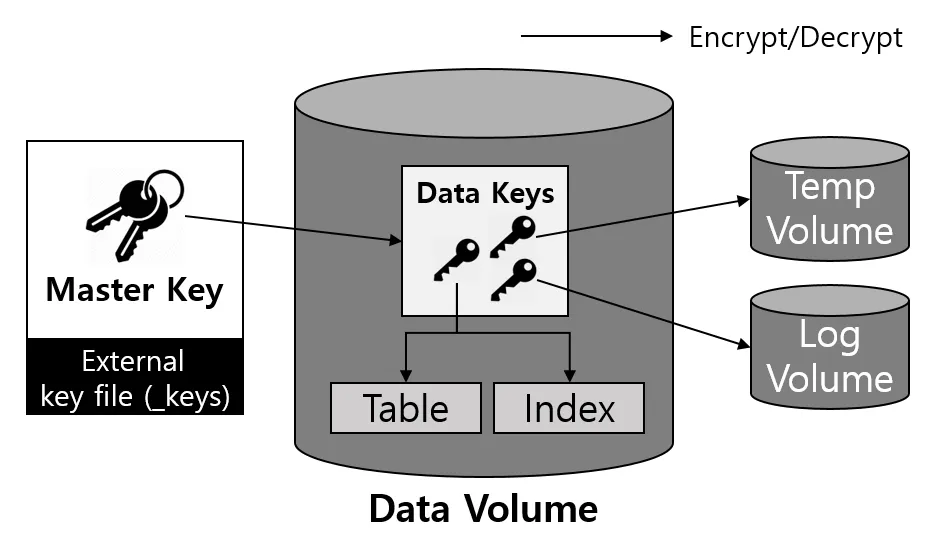
- Master key: A key used when encrypting and decrypting data keys, and it is managed by DBA user.
- Data key: A key used when encrypting user data such as table and log, and it is managed by CoraDB Engine.
Data keys are stored within the data volume and are always securely encrypted using a master key when written to disk. The master key is stored in a separate file, and it must be managed safely according to the security policy users comply with.
Managing keys in two levels makes it possible to perform the key change operation efficiently. If there is only a key that encrypts the user data, it takes a long time to work when you change the key. All the data that has been encrypted has to be read, decrypted, and re-encrypted. Also, the overall performance of the database may be degraded during this process.
File-based master key management
Section titled “File-based master key management”Master keys are separately stored and managed as a separate key file so that the user can manage master keys in various ways according to individual security requirements. This key file contains all the information of master keys, so if it is leaked, there may be a security problem, and if it is lost, the encrypted data cannot be read (When TDE is unavailable). So, be careful to manage this key file.
By default, the key file is created with the name of <database-name>_keys at the location where the data volume is created when creating a database using coradb createdb utility. Without additional configuration for the key file, this key file is automatically used. The location of the key file te be used can be changed by a system parameter. For more information, see Disk-related parameters.
The key file can contain several master keys (up to 128). A master key among those keys is set on the database to encrypt the database, data keys technically. One master key is created and set by default when the key file is created, and DBA can add, delete, change, and search keys using the TDE utility (TDE utility). When deleting a key, the key to delete must exist in the key file, and the key set on the database currently cannot be removed. When changing a key to set to encrypt a database, both the previously key set on the database and the key to be set must exist in the key file. Through key inquiry, you can check the number of keys and creation time of them, and you can check the current key set on the database and setting time.
$ coradb tde --show-keys testdbKey File: /home/usr/CoraDB/databases/testdb/testdb_keys
The current key set on testdb:Key Index: 2Created on Fri Nov 27 11:14:54 2020Set     on Fri Nov 27 11:15:30 2020
Keys Information:Key Index: 0 created on Fri Nov 27 11:11:27 2020Key Index: 1 created on Fri Nov 27 11:14:47 2020Key Index: 2 created on Fri Nov 27 11:14:54 2020Key Index: 3 created on Fri Nov 27 11:14:55 2020
The number of keys: 4Encryption target
Section titled “Encryption target”Permanent data encryption
Section titled “Permanent data encryption”The encrypted table data and all index data created on the table are encrypted. For more information on the encrypted table, see Table encryption (TDE).
Temporary data encryption
Section titled “Temporary data encryption”In addition to persistent data such as tables, temporary data created during queries related to encrypted tables are also encrypted. For example, all temporary data created in executing a query such as SELECT * FROM tde_tbl ORDER BY att1 or creating an index on tde_tbl are encrypted when it is written to disk. For more information on temporary data, see Temporary volume.
Log data encryption
Section titled “Log data encryption”Since the data which has to be encrypted may be included in the REDO and UNDO log records generated when the encrypted table is manipulated, all log data related to the encrypted table is encrypted. Encryption is applied to both the active log and the archive log. For more information on log volumes, see Database volume.
DWB encryption
Section titled “DWB encryption”Persistent data is temporarily written to the Double Write Buffer (DWB) before being written to the data volume. It may be encrypted even at this time because the data for the encrypted table can be included. For more information on DWB, see Database volume.
Backup encryption
Section titled “Backup encryption”If there are encrypted data in data volumes and log volumes, they are also stored as encrypted in backup volumes. For more information on backup, see backupdb.
Backup key file
The backup volume contains the key file by default. If the backup volume, including the key file, is leaked, meaning the master key is also leaked. There may be a security problem even though the data in the volume is encrypted. To prevent this, you can backup the key file separately by using the \\separate-keys option. However, in the case of separating the key file, it must be managed carefully to prevent losing the key file for database restore. The separated backup key file is created in the same directory path as the backup volume and has the name <database_name>_bk<backup_level>_keys.
$ coradb backupdb -S --separate-keys testdbBackup Volume Label: Level: 0, Unit: 0, Database testdb, Backup Time: Mon Nov 30 14:34:49 2020$ lslob testdb testdb_bk0_keys testdb_bk0v000 testdb_bkvinf testdb_keystestdb_lgar_t testdb_lgat testdb_lginf testdb_vinfThe key file used to restore
The key file separated during backup can be given as the key file for restoration by using the \\keys-file-path option (restoredb). If the valid key file does not exist in the specified path, restore fails.
If the \\keys-file-path option is not given, the key file to be used is searched according to the following priority. If the valid key file cannot be found, restore fails.
Key file classification
- Server key file: A key file that is generally used when running the server. It can be set with the tde_keys_file_path system parameter or in the default path same as the data volume.
- Backup key file: A key file created during backup included in the backup volume or separated by \\separate-keys option.
The priority of the key file to use for restore
- The backup key file that the backup volume contains.
- The backup key file created with the \\separate-keys option during backup (e.g. testdb_bk0_keys). This key file must exist in the same path as the backup volume.
- The server key file in the path specified by the tde-keys-file-path system parameter.
- The server key file in the same path as the data volume (e.g., testdb_keys).
Encryption algorithm
Section titled “Encryption algorithm”CoraDB supports the following encryption algorithms for TDE.
TDE encryption algorithm
| Algorithm | Key size | Option name |
|---|---|---|
| Advanced Encryption Standard | 256 bits | AES |
| ARIA | 256 bits | ARIA |
Advanced Encryption Algorithm (AES) is a specification established by the National Institute of Standards and Technology (NIST) and is widely used worldwide. It has high stability and many optimizations are supported by many platforms such as hardware acceleration, so there is little performance degradation during encryption/decryption. ARIA is one of Korea's national standard encryption algorithms and is optimized for lightweight environments and hardware implementation.
Table encryption checking
Section titled “Table encryption checking”You can check whether the table is encrypted by following three ways.
SHOW CREATE TABLE
Section titled “SHOW CREATE TABLE”CREATE TABLE payment_card (customer_id INT, card_token VARCHAR(64)) ENCRYPT=AES;SHOW CREATE TABLE payment_card;| TABLE | CREATE TABLE |
|---|---|
| payment_card | CREATE TABLE [payment_card] ([customer_id] INTEGER, [card_token] CHARACTER VARYING(64)) REUSE_OID, COLLATE utf8_bin ENCRYPT=AES |
Inquiry to db_class
Section titled “Inquiry to db_class”The tde_algorithm column of the catalog view db_class (or _db_class) shows the encryption of each table:
SELECT class_name, tde_algorithm FROM db_class WHERE class_name LIKE 'payment%' ORDER BY 1;| class_name | tde_algorithm |
|---|---|
| payment_card | AES |
| payment_card2 | ARIA |
| payment_log | NONE |
Using coradb diagdb utility
Section titled “Using coradb diagdb utility”You can check by referring to tde_algorithm among the file header information of encrypted tables and index files from the result by coradb diagdb utility with the -d1 (dump file tables) option. For more details, see diagdb.
$ coradb diagdb -d1 testdb...Dumping file 0|3520 file header: vfid = 0|3520 permanent regular tde_algorithm: AES page: total = 64, user = 1, table = 1, free = 62 sector: total = 1, partial = 1, full = 0, empty = 0...When TDE is unavailable
Section titled “When TDE is unavailable”In the following cases, the TDE feature cannot be used, and an error occurs because the TDE module cannot be loaded correctly.
- When the valid key file cannot be found
- When the key set on the database cannot be found in the key file
Even if the TDE module is not loaded, the server can start normally, and users can access unencrypted tables. This means that all DML and DDL such as SELECT and INSERT only for TDE-encrypted tables cannot be executed.
However, the case log data has been encrypted is different. If the log data is encrypted when the TDE module is not loaded and the log is accessed by recovery, VACUUM, etc., the system cannot be properly executed, and the entire server has no option but to stop running the server.
TDE restriction
Section titled “TDE restriction”In addition to the restrictions described above, there are the following.
- CoraDB does not support the ALTER TABLE statement to change the TDE table option, which means you cannot set TDE to existing tables. If you want to do that, you need to move the data to the new table created with the TDE table option.
- SQL log is not encrypted. For more information on the SQL log, see Managing the SQL log.