
Native multi-model database management system (DBMS)
Relational Power, Graph Intelligence. Together.
CoraDB runs SQL and PGQL graph queries in one engine, over one connection, on the same data.
Around it: AI-assisted apps, MCP servers for AI tools, drivers for your languages and ten demo databases to start from.
-- Top 5 customers by revenue, and their city
SELECT cu.company_name, ci.name AS city,
       SUM(oi.quantity * p.unit_price) AS total_spent
FROM MATCH (cu:customer)-[:resides_in]->(ci:city),
     orders o, order_items oi, product p
WHERE o.customer_id = cu.id
  AND oi.order_id = o.id
  AND oi.product_id = p.id
GROUP BY cu.id, cu.company_name, ci.name
ORDER BY total_spent DESC
LIMIT 5;The CoraDB ecosystem
One engine, a complete toolset.
Everything you need to query, visualize, administer and migrate relational and graph data, with AI built in where it helps.
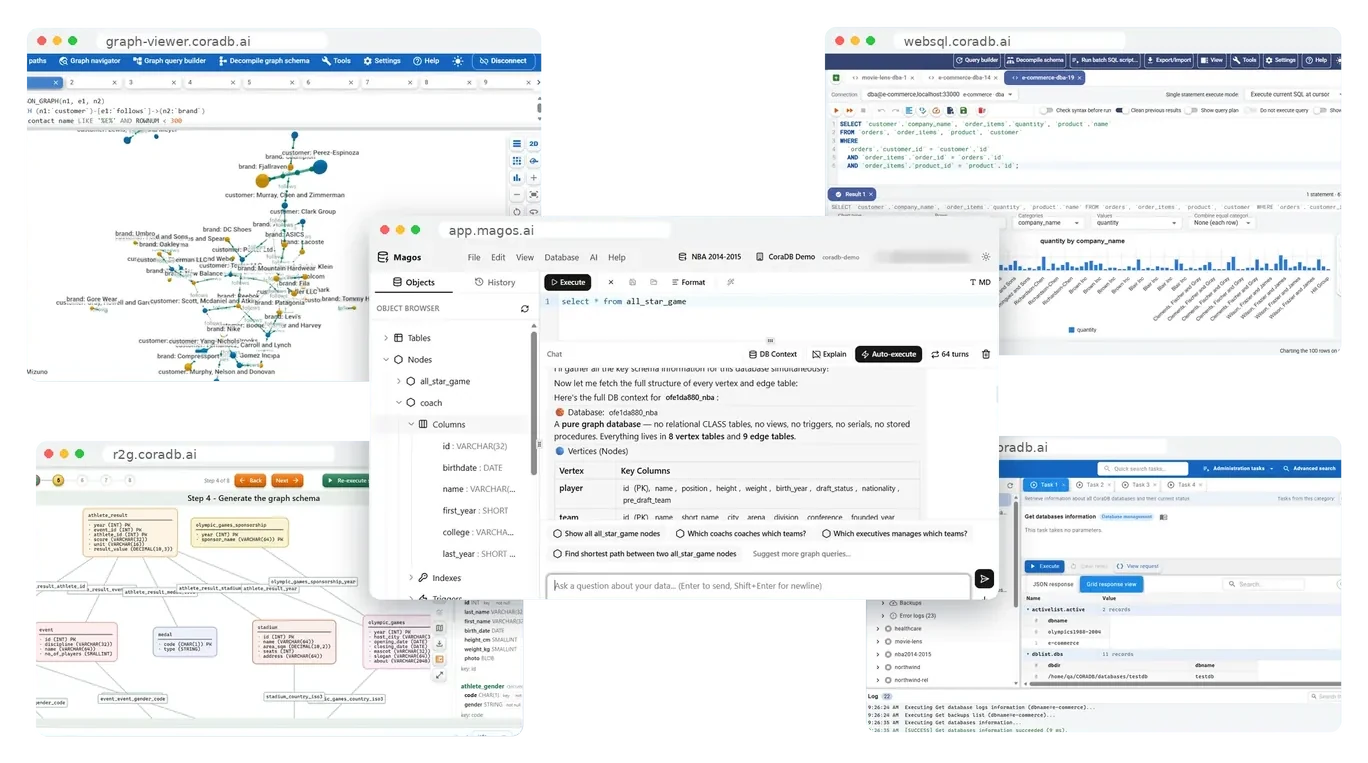
- MagosAI assistant and SQL workspace: ask in plain language, get the query and the answer.
- Graph ViewerSee graph data as interactive networks, run graph algorithms, ask AI.
- WebSQLThe SQL client in your browser, with plans, traces and charts.
- WebAdmin80+ guided administration tasks, with optional AI help.
- Relational-to-GraphA wizard that turns a relational schema into a CoraDB graph.
MCP servers
Let Claude and other AI apps read the schema and run queries, or carry out administration tasks.
Drivers
JDBC, ADO.NET, Python, PHP and Node.js, all talking to the broker directly.
Demo databases
Ten relational, graph and hybrid datasets.
Manual
Installation, SQL and PGQL reference, administration and the graph tutorial.
AI built in
AI where it helps, on your terms.
The CoraDB apps ship with AI assistants. In Magos you ask a question in plain language and get the SQL or graph query, the results and an explanation. Graph Viewer writes SELECT … MATCH graph queries from a question and explains graphs and analytics results. WebAdmin turns a sentence into administration tasks for you to review, and explains logs in ordinary words. AI help for Relational-to-Graph migrations is next.
You choose the model: Anthropic, OpenAI, Google Gemini, OpenRouter or local models through LM Studio and Ollama, with usage and cost tracked.
The AI suggests; a person decides, and the apps work fully without it.
And with the CoraDB MCP servers, AI apps such as Claude can read your schema and query your data directly.
- Plain-language questions to SQL and PGQL queries
- Explanations of results, graphs, errors and logs
- Your choice of provider, including local models
- Changes previewed, destructive steps confirmed
- MCP servers for Claude and other AI apps
Why one engine
Many modern solutions need graphs, but a separate graph database creates problems.
Adding a graph-only engine next to your relational database means data travels back and forth: intermediate data, results and history have to live somewhere, and the two engines have to be kept in sync.
That adds complexity and costs performance.
CoraDB keeps both models in the same core, so a single query can combine them.
Use casesBoth graph and relational capabilities, in a single database.
Unified storage
Everything related to graph data processing is stored in the same multi-model database.
Native performance
Graph processing is implemented natively, in the database core, not as an add-on.
Clean relational
Your primary relational data is not polluted with extra data, temporary or not.
Single connection
One connection type reaches all relational and graph data, including graph processing results.
SQL and PGQL together
Combine SQL with PGQL graph pattern matching (MATCH, variable-length paths) in the same statement.
Built on CUBRID 
A mature open-source relational engine, extended by Arnia Software for over 12 years: joins, recursive CTEs, analytics, MVCC transactions.
Get started
From schema to graph query in three steps.
The same steps as the Getting Started guide, on the e-commerce demo database: its scripts create the graph and fill it, then one query reads the graph and a relational table together.
Define vertices and edges
CREATE VERTEX TABLE brand (
  id INT PRIMARY KEY,
  name VARCHAR(32) NOT NULL);
CREATE EDGE TABLE manufactures (
  since DATETIME NOT NULL);
Insert data
INSERT VERTEX INTO brand
  VALUES (1, 'Nike');
INSERT EDGE
  FROM (SELECT brand FROM brand
        WHERE id = 1)
  TO (SELECT product FROM product
      WHERE id = 141)
  INTO manufactures
  VALUES ('2020-04-09 14:30:56');
Query graph and tables together
SELECT p.name AS product,
       SUM(oi.quantity) AS units_sold
FROM MATCH
  (b:brand)-[:manufactures]->(p:product),
  order_items oi
WHERE b.name = 'Nike'
  AND oi.product_id = p.id
GROUP BY p.name
ORDER BY units_sold DESC;
Our partner
Arnia Software partnership.
Our main financing partner, Arnia Software, is a leading global software development company that provides a full range of software services.
The partnership gives us access to rich technology expertise and top engineering resources, so we can provide a comprehensive range of high-quality IT services based on our flagship product, CoraDB.

Try CoraDB on real data
Download a demo database, load it with two scripts and run its demo queries, or ask us for access to the apps.