
Getting Started
Start from real data
From a demo database to SQL + graph queries.
Load a ready-made database, connect to it, and run SQL, graph and hybrid queries.
Every query on this page runs as it is on the e-commerce demo database, and the results shown are what it returns.
Get CoraDB Download Load Connect SQL Graph Multi-hop Variable length Hybrid
-
Step 1
Get CoraDB
CoraDB runs on 64-bit Linux; Windows and macOS are coming next.
The evaluation version (installer or Docker image) is available on request.Prefer not to install anything yet?
The built-in apps run in the browser and can connect to a hosted database that already has the demo data.Linux 64-bit 1 GB of memory or more 2 GB of free disk space or moreFrom the system requirements in the manual. -
Step 2
Download the e-commerce demo database
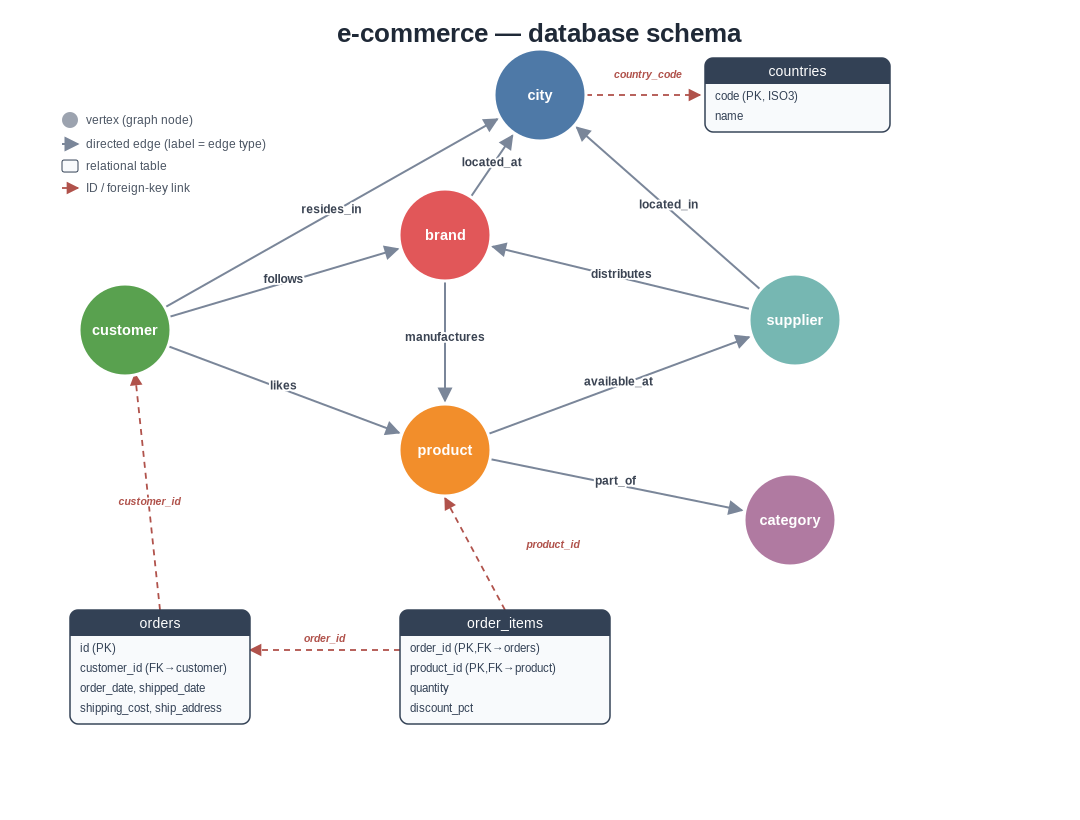
The e-commerce database models an online apparel and gear store. It is hybrid: customers, products, brands, suppliers, categories and cities are graph vertices linked by edges such as
likes,followsandmanufactures, whileorders,order_itemsandcountriesare ordinary relational tables.The zip holds:
DDL.sql: the schema, with relational tables, vertex tables and edge tablesDML.sql: the dataGrant to public.sql: read access for every userDemo queries.txtandAdvanced queries.md: ready-to-run queriesREADME.md: what the database modelsschema.png,schema.svg: the schema diagram
-
Step 3
Create the database and load the data
Unzip, create a database named
e-commerce, start the CoraDB service and the database server, then run the three scripts in this order withcorasql -i.% unzip e-commerce.zip && cd e-commerce % coradb createdb e-commerce en_US % coradb service start % coradb server start e-commerce % corasql -u dba -i DDL.sql e-commerce % corasql -u dba -i DML.sql e-commerce % corasql -u dba -i "Grant to public.sql" e-commerce -
Step 4
Connect
Connect with the
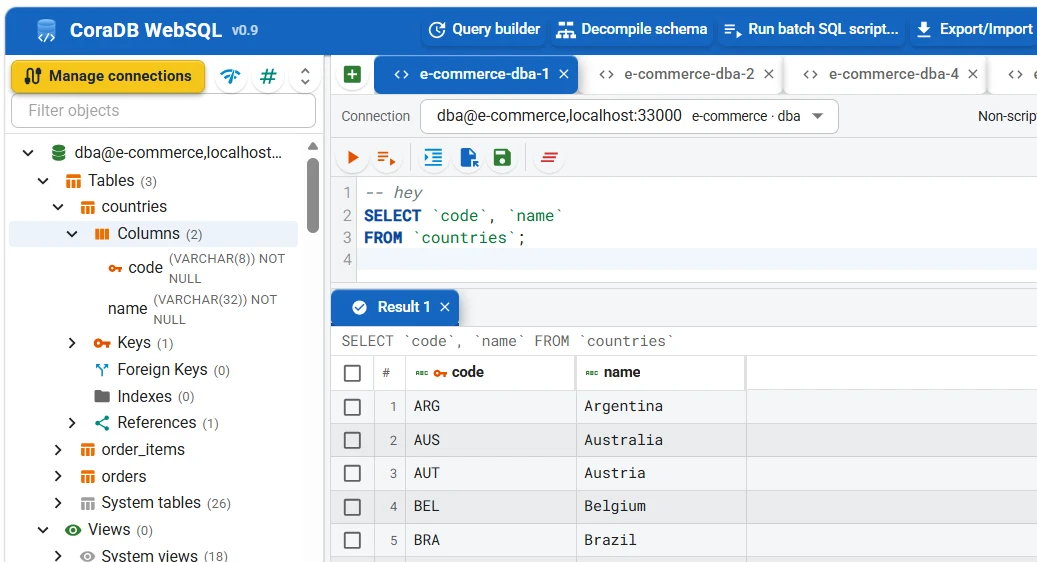
corasqlinterpreter, with WebSQL or Magos in the browser, or from your own code through a driver. The connection details are the same everywhere: the broker listens on port 33000.Host localhostBroker port 33000Database e-commerceUser dba(no password on a new database)In WebSQL, open Manage connections, add one with these details, then pick it from the connection list above the editor.
% corasql -u dba e-commerceThe command-line interpreter: type a statement, end it with ; and press Enter. // npm install @coradb/node-coradb const CoraDB = require('@coradb/node-coradb'); const conn = CoraDB.createConnection({ host: 'localhost:33000', user: 'dba', password: '', database: 'e-commerce' }); const { rows } = await conn.sql( 'SELECT name FROM MATCH (p:product)-[:part_of]->(c:category) ' + 'WHERE c.name = ?', ['Seafood']); await conn.close();// coradb-jdbc-1.0.0.jar on the classpath String url = "jdbc:coradb:localhost:33000:e-commerce:dba::"; try (Connection conn = DriverManager.getConnection(url)) { // conn.prepareStatement(...) as with any JDBC driver } -
Step 5
Your first SQL query
The relational tables answer the usual questions with plain SQL.
Here, the number of orders per year:-- How many orders were placed each year? SELECT YEAR(order_date) AS order_year, COUNT(*) AS orders FROM orders GROUP BY YEAR(order_date) ORDER BY order_year;relational table Result5 rowsorder_year orders 2021 416 2022 482 2023 551 2024 675 2025 786 -
Step 6
Your first graph query
A
MATCHpattern in theFROMclause describes the path to find: from a customer, along aresides_inedge, to a city.-- Which customers reside in the city of London? SELECT cu.company_name, cu.contact_name FROM MATCH (cu:customer)-[:resides_in]->(ci:city) WHERE ci.name = 'London';graph pattern (PGQL) Result35 rows, first 5 showncompany_name contact_name Bradford-Brown Alexander Fuller Thompson, Hart and Torres Michael Johnson Blanchard-Phelps Amanda Bell Jones-Boyd Gregory Burgess Brown, Lambert and Wells Joshua Stone -
Step 7
Follow several relationships
Chain patterns to walk further: supplier → brand → product → category.
In SQL this would be a chain of joins through link tables; here it reads like the question.-- Which suppliers distribute a brand that manufactures -- products in the "Condiments" category? SELECT DISTINCT s.company_name, b.name AS brand, p.name AS product FROM MATCH (s:supplier)-[:distributes]->(b:brand), (b:brand)-[:manufactures]->(p:product), (p:product)-[:part_of]->(c:category) WHERE c.name = 'Condiments';graph pattern (PGQL) Result85 rows, first 5 showncompany_name brand product Cooperativa de Quesos 'Las Cabras' DC Shoes Northwoods Cranberry Sauce Escargots Nouveaux Burton Aniseed Syrup Escargots Nouveaux Burton Chef Antons Cajun Seasoning Exotic Liquids Kari Traa Genen Shouyu Exotic Liquids Kari Traa Grandmas Boysenberry Spread -
Step 8
Paths of variable length
{2,2}asks for paths of exactly twofollowsedges, in either direction: brand ← customer → brand. Use{1,3}for one to three hops.-- Find pairs of brands that share at least one follower -- (exactly 2 follow-hops). SELECT DISTINCT b1.name, b2.name FROM MATCH (b1:brand)-[:follows{2,2}]-(b2:brand) WHERE b1.id < b2.id;graph pattern (PGQL) Result105 rows, first 5 shownb1.name b2.name Adidas Pearl Izumi Adidas Rossignol Nike ASICS Nike Adidas Nike Alo Yoga -
Step 9
Combine SQL and graph
Graph patterns and relational tables mix in the same statement. Cities are graph vertices with an ISO country code; the relational
countriestable turns it into a name.-- How many customers reside in each country? SELECT co.name AS country, COUNT(cu) AS customers FROM MATCH (cu:customer)-[:resides_in]->(ci:city), countries co WHERE ci.country_code = co.code GROUP BY co.name ORDER BY customers DESC;graph pattern (PGQL)relational table Result25 rows, first 5 showncountry customers United States 496 Germany 70 France 67 Brazil 50 United Kingdom 45
Where to go next
More e-commerce queries
More demo queries in the zip, from simple lookups to shortest paths.
Graph tutorial
Build a graph from scratch: vertex and edge tables, INSERT EDGE, JSON inspection.
Use cases
Worked examples on the e-commerce, Northwind and healthcare databases.
Built-in apps
Query, visualize and administer CoraDB in the browser, with AI help.